Executions
The Executions page allows you to view the complete history of all KAI-Flow workflow executions.
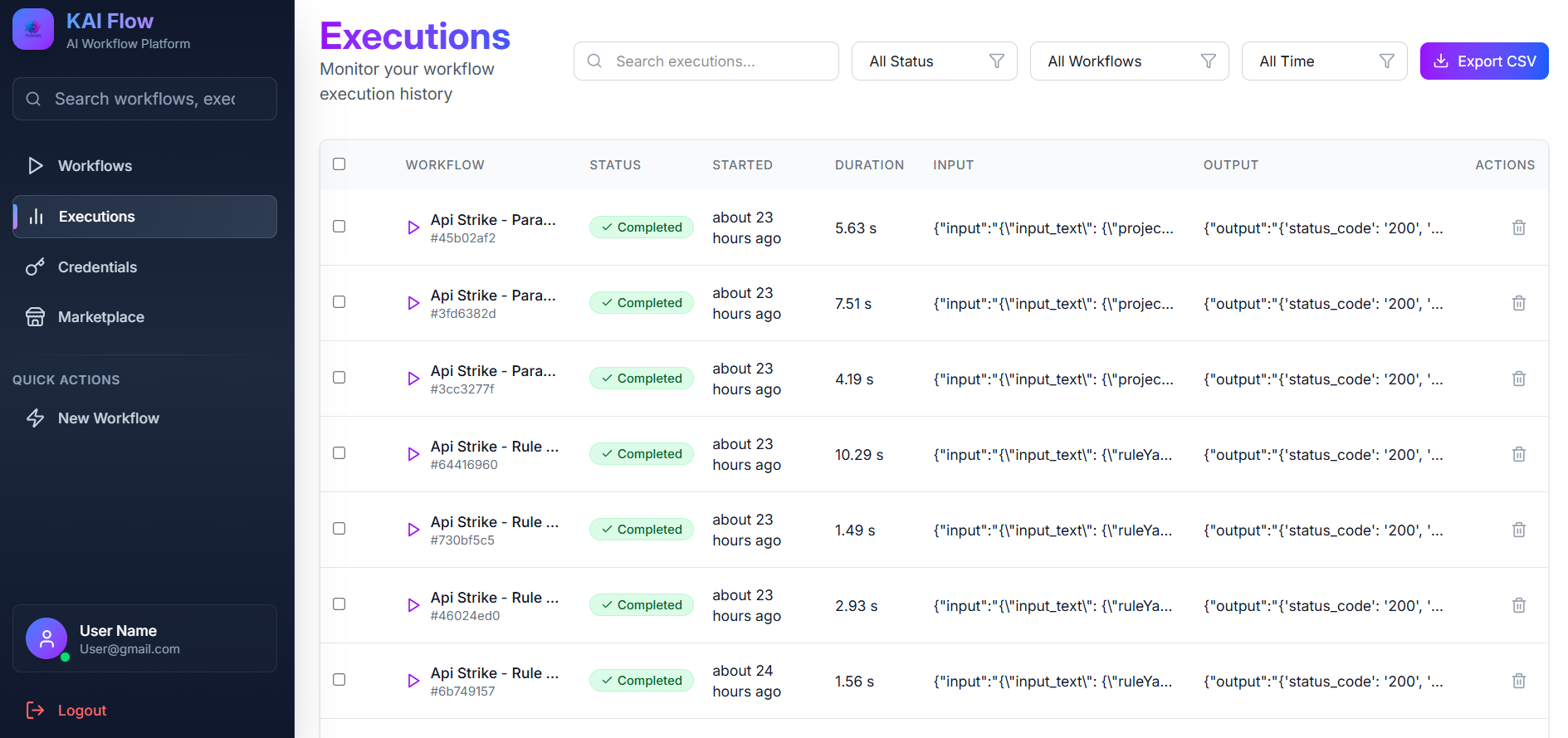
Filter: Used to narrow down execution results. You can filter by execution status, workflow, date range, or input text. A Clear Filters button is available to reset all filters.
Use the selection checkbox to select all executions and delete multiple executions at once.
Executions List: It displays executions in a table with the following details:
- Execution ID
- Workflow name (clickable)
- Execution status
- Input text preview
- Output text preview (Click to view full output)
- Execution duration
- Start time
Each execution includes a Delete option. The list supports pagination for easy navigation through execution history.
At the top of the page, there is an Export CSV button which allows you to download execution data for external reporting and analysis.
Execution statuses are indicated with color-coded badges:
- Pending (yellow)
- Running (blue, animated)
- Completed (green)
- Failed (red)
Execution Details: Click an execution to view detailed information, including the full input and output text, error messages (if any), and a step-by-step execution trace.
Workflow Execution Cancellation API
External systems or projects (such as DevOps pipelines or external triggers) can cancel active workflow executions (both running or pending) via the KAI-Flow API.
Authentication
To authenticate against the Cancellation API, you must send the X-API-KEY header in your request:
X-API-KEY: YOUR_API_KEYCancel Active Executions by Workflow Name
Cancels all active (pending or running) executions of a specified workflow in a single API call.
- HTTP Method:
POST - Base URL:
https://your-domain.com/kai/api/v1 - Endpoint:
/executions/workflows/{workflow_name}/cancel - Path Parameters:
workflow_name(string): The name or slug of the target workflow.
Note: Non-ASCII characters and spaces in the workflow name are automatically normalized by the system (e.g."My Custom Workflow"becomes"my-custom-workflow").
Request Examples
cURL Example
Run the following command to cancel all active executions of the your-workflow-name workflow:
curl -X POST "https://your-domain.com/kai/api/v1/executions/workflows/your-workflow-name/cancel" \
  -H "X-API-KEY: YOUR_API_KEY"
Postman Instructions
- Set the HTTP method to POST.
- Enter the Request URL:
https://your-domain.com/kai/api/v1/executions/workflows/your-workflow-name/cancel - In the Headers tab, add the following key-value pair:
- Key:
X-API-KEY - Value:
YOUR_API_KEY
- Key:
- Leave the request body as none.
- Click Send.
Response Format
A successful request returns a list of the cancelled executions. The execution status is updated to cancelled, and the error_message field contains the reason for cancellation.
Success Response Example (HTTP 200 OK):
[
  {
    "id": "550e8400-e29b-41d4-a716-446655440000",
    "workflow_id": "2a8f89c0-1111-2222-3333-444455556666",
    "status": "cancelled",
    "error_message": "Execution cancelled manually",
    "started_at": "2026-06-17T15:30:00Z",
    "completed_at": "2026-06-17T15:31:00Z"
  }
]