Credentials
The Credentials page allows you to securely store and manage API keys and service credentials for KAI-Flow.
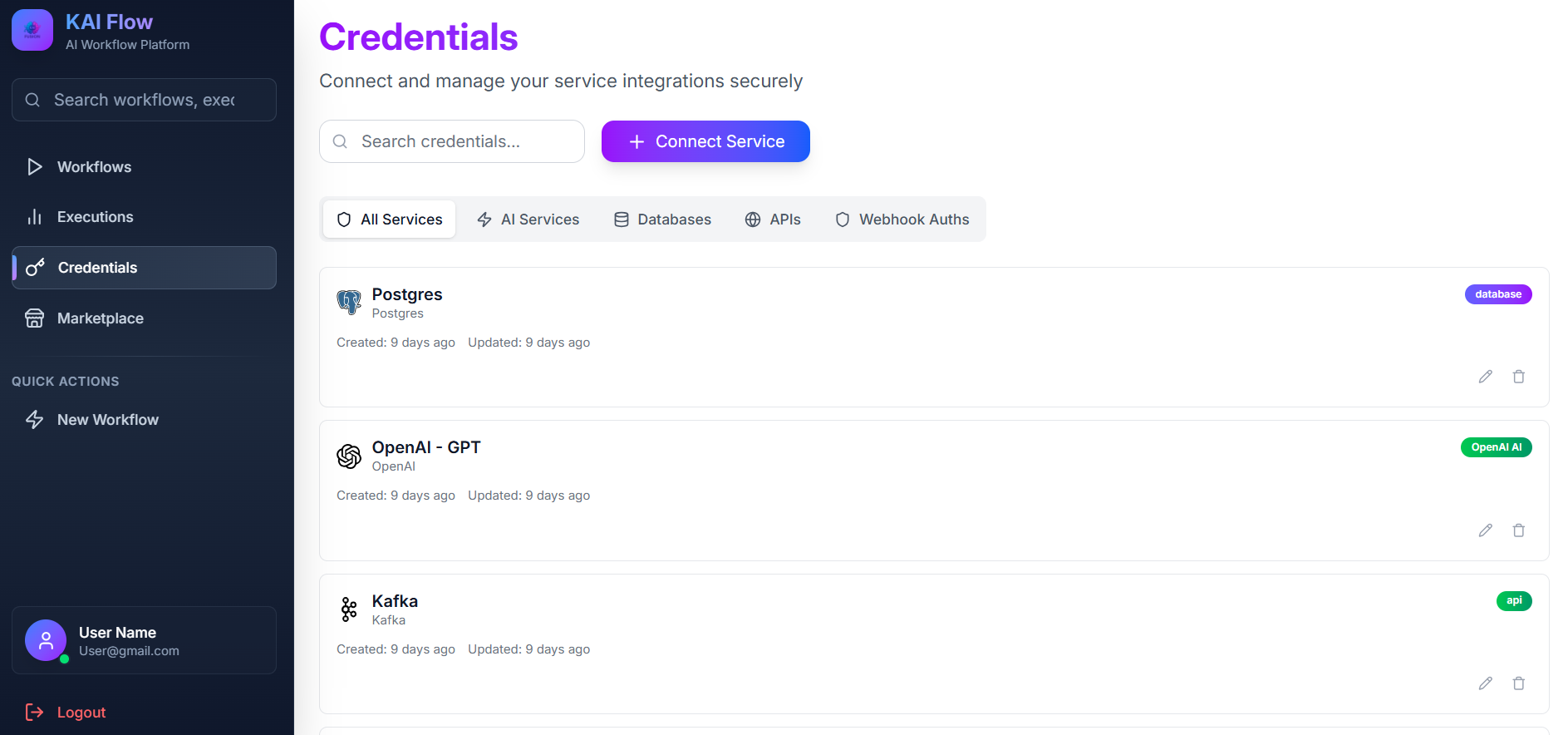
Service Category Tabs: Allows you to filter credentials by service type. Available categories include AI, Search, Database, and Cloud.
Search: Used to filter credentials by name.
Add Credential: Opens the service selection modal to add a new credential.
Credentials Grid: Displays all saved credentials. Each credential card shows the service icon, credential name, service type, creation date, and management actions. You can use the Edit button to update a credential or the Delete button to remove it.
Adding New Credentials
To add a new credential:
- Click Add Credential.
- Select a service type from the list.
- Enter the credential details, including a name, API key, and any service-specific fields.
- Click Save.
Supported Services
KAI-Flow supports the following credential types, organized by category:
AI Services
- OpenAI: Stores OpenAI API keys for GPT models and embeddings.
API Key(required) — Your OpenAI API key (starts withsk-)
- OpenAI Compatible: Connects to self-hosted models or alternative endpoints (e.g. OpenRouter, vLLM, DeepSeek, LM Studio).
Base URL(required) — The endpoint URL for the compatible serviceModel Name(required) — The model name/identifier (e.g.llama3-70b-8192)API Key(required) — The authentication key for the serviceSkip SSL Certificate Verification(optional) — Enable when using self-signed certificates
- Cohere: For embeddings and reranking capabilities.
API Key(required) — Your Cohere API key
APIs & Search
- Tavily Search: Tavily AI search API for web search capabilities.
API Key(required) — Your Tavily search API key (starts withtvly-)
Databases
- Postgres: PostgreSQL database with vector extension (
pgvector) for storing embeddings and retrieval.Host(required) — PostgreSQL server hostname or IP addressPort(required) — PostgreSQL server port (typically5432)Database Name(required) — Name of the database to connect toUsername(required) — Database usernamePassword(required) — Database password
Storage
- MinIO / S3 Storage: S3-compatible object storage credentials for MinIO or AWS S3.
Endpoint URL(required) — Host and port for your MinIO/S3 instance (e.g.localhost:9000ors3.amazonaws.com)Access Key(required) — Access key IDSecret Key(required) — Secret access keyUse SSL (HTTPS)(optional) — Enable if the endpoint requires secure connection
Message Brokers
- Kafka: Apache Kafka connection credentials for producing and consuming messages.
Client ID(required) — A unique identifier for the Kafka clientBrokers(required) — Comma-separated list of Kafka broker addresses (e.g.host1:9092,host2:9092)Security Protocol(optional) — Protocol used to communicate (PLAINTEXT,SASL_PLAINTEXT,SASL_SSL,SSL)SASL Mechanism(optional) — SASL mechanism for authentication (PLAIN,SCRAM-SHA-256,SCRAM-SHA-512)SASL Username(optional) — SASL credential usernameSASL Password(optional) — SASL credential passwordSSL CA Certificate Path(optional) — File path to CA certificate
Webhook Authentication
- Basic Auth: Username and password credentials to secure incoming webhook trigger endpoints.
Username(required) — Username for Basic AuthenticationPassword(required) — Password for Basic Authentication
- Header Auth: Header-based keys (e.g., custom token headers) to secure incoming webhook trigger endpoints.
Header Name(required) — The HTTP header name (defaults toAuthorization)Header Value(required) — The secret value that must match the custom header
Security Note: All credentials are encrypted at rest using a master key (
CREDENTIAL_MASTER_KEY). They are decrypted only when needed during workflow execution.